This document is outdated
This page is part of the legacy 1.0.x documentation. We recommend using the latest documentation instead.
Test PWA Installability
You can now launch the React site locally using your project's existing workflow.
Run the DevServer:
- npm
- pnpm
- Yarn
npm run dev
pnpm run dev
yarn dev
Or run a static web server:
- Vite
- Next.js
- npm
- pnpm
- Yarn
npm run build
npm run preview
pnpm run build
pnpm run preview
yarn build
yarn preview
- npm
- pnpm
- Yarn
npm run build
npm run start
pnpm run build
pnpm run start
yarn build
yarn run start
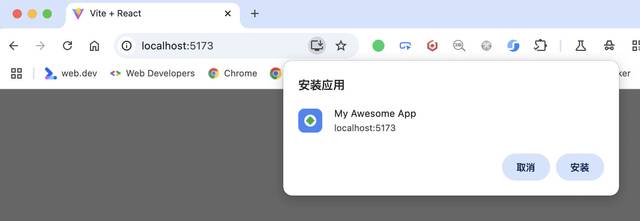
Then open the site's local URL in Chrome or Edge. You should see the PWA install button in the address bar of your browser:

Open your browser's DevTools, you should see how the browser has parsed the Web App Manifest for this page.
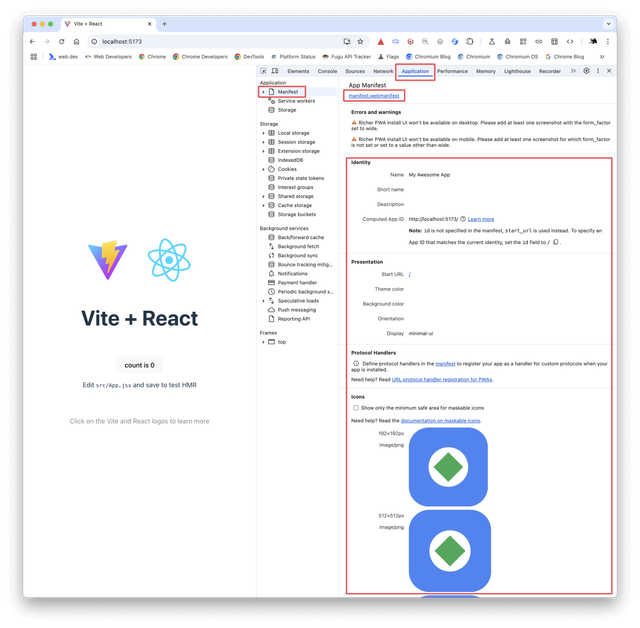
At this point, the site qualifies as a minimal PWA.
tip
After deploying to production, the site must be served over HTTPS. Otherwise, the browser will not recognize it as a PWA.